Two clouds hold most of what a modern business knows about its customers, and they almost never talk. Salesforce owns the relationship — accounts, cases, opportunities. Google BigQuery owns the scale — clickstream, product telemetry, years of history and the ML to make sense of it. The old answer was a nightly ETL pipeline copying data back and forth, always stale, always expensive, always breaking. In 2026 that’s no longer the architecture I reach for. With bidirectional zero-copy between Salesforce Data 360 (the platform formerly known as Data Cloud) and BigQuery, you can treat both as one system — no copies, no pipelines. This post is the use case, end to end.
What I’ll Cover in This Blog
- ✔️ The scenario — a retailer whose CRM and warehouse can’t see each other
- ✔️ The target architecture — bidirectional zero-copy, both directions explained
- ✔️ The enablement path — federate in, share out, activate back
- ✔️ What it costs and what it returns — the honest, and genuinely large, savings
- ✔️ The pitfalls — latency, cost surprises, and governance across clouds
Now, let’s dive in. 🔥
The Scenario
Cadence Retail runs Salesforce for sales and service and BigQuery as its analytics warehouse. Marketing wants to build audiences from purchase history that lives in BigQuery. Data science has churn and propensity models in BigQuery ML but no clean way to act on them inside Salesforce. Today an engineer maintains three fragile ETL jobs to shuttle data between them; the audiences are a day old and the models’ scores never make it to a salesperson in time to matter.
Cadence doesn’t need more pipelines. It needs the two clouds to behave like one — and it needs to stop paying to copy the same records twice.
The Target Architecture
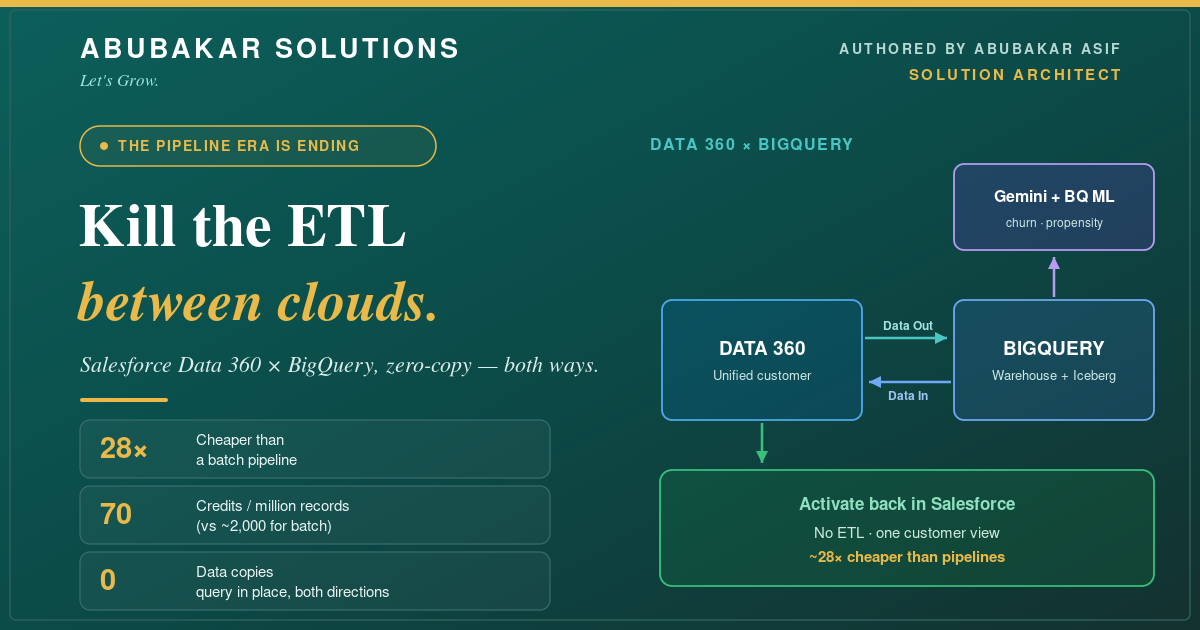
The mental model is simple: query data where it lives, in both directions. Data 360 can read BigQuery tables in place (federation), and it can publish its own objects so they appear natively inside BigQuery (sharing via Analytics Hub). Add Gemini and BigQuery ML on top, then activate the results back in Salesforce.
- 🔹 Data In — federation. Data 360 connects to BigQuery tables through a native connector and queries them *in place* as external data lake objects. Cadence’s clickstream never leaves BigQuery, but it’s usable inside Data 360 for segmentation. This is the same “bring the source to the model” idea I used in Salesforce Data Cloud in Action.
- 🔹 Data Out — sharing. Data 360 assembles a set of objects and links them to BigQuery via Analytics Hub, where they appear as native tables or views. Data science can now join live CRM data with warehouse history and run BigQuery ML and Gemini in BigQuery over the combined set — no export step.
- 🔹 Activate back. The scores and segments produced in BigQuery flow back into Salesforce — increasingly via continuous queries that keep downstream apps current — so a salesperson sees the churn score *on the record*, not in a dashboard nobody opens.
The Enablement Path
Phase 1: Federate BigQuery into Data 360
- 🔹 What: Stand up the BigQuery connector and expose the two or three tables that matter (purchases, sessions) as external objects. Map them to your Data 360 model.
- 🔹 Why: You get warehouse breadth inside Salesforce immediately, with zero data movement.
- 🔹 Watch: Federation sends live queries to BigQuery. For interactive segmentation over huge tables, mind query cost and shape — federate the columns you need, not the whole lake.
Phase 2: Share Data 360 out and build the models
- 🔹 What: Publish the Data 360 objects to BigQuery via Analytics Hub. Let data science join them with history and train BigQuery ML models — churn, propensity, lifetime value — or run Gemini in BigQuery for unstructured signals like support-note sentiment.
- 🔹 Why: The models finally see the whole customer, not half of it. And BigQuery’s Managed Iceberg (now GA) keeps the storage open, so you’re not locked in.
- 🔹 How: Keep the training set governed and consent-aware — the consent flags live in Data 360 for a reason, so carry them into every audience.
Phase 3: Activate and operationalize
- 🔹 What: Bring scores and segments back into Salesforce and wire them to action — a next-best-action on the case, a priority flag for the SDR, an audience for a journey.
- 🔹 Why: Insight that never reaches the point of work is waste. Activation is where the ROI actually shows up.
- 🔹 How: Prefer near-real-time paths (continuous queries) for signals that decay fast, and scheduled shares for slow-moving segments. Match freshness to the decision, the same trade-off I flagged for analytics in Unlocking HR Insights with Tableau.
What This Costs / What It Returns
- 🔹 The savings are not marginal. Salesforce reports zero-copy federation runs about 70 credits per million records versus ~2,000 for a batch pipeline — roughly a 28x reduction — before you count the engineer you no longer need maintaining ETL.
- 🔹 You pay for queries, not copies. BigQuery has cut query cost ~40% year over year, and federation means you’re not paying twice to store the same data. Budget for compute and watch federated query patterns.
- 🔹 The return is speed and trust. Audiences and scores go from a day old to near-real-time, decisions get made on live data, and there’s one governed customer view instead of three drifting copies. That this is now a mainstream pattern is clear from the numbers — Salesforce moved 15 trillion records through zero-copy in a single recent quarter.
Common Pitfalls
- ✔️ Federating the firehose. Don’t expose the entire warehouse. Federate the tables and columns a use case needs, or query costs balloon.
- ✔️ Latency mismatch. Federation is federated — for sub-second, mid-conversation lookups, materialize instead. Reach and latency are different jobs.
- ✔️ Consent left behind. If consent and privacy flags don’t travel with the data into BigQuery audiences, you’ve built a compliance problem. Carry them everywhere.
- ✔️ Insight with no activation. A model whose scores never reach Salesforce is a science project. Design the activation path in Phase 1, not as an afterthought.
- ✔️ Governance per cloud. Two clouds means two access models. Decide who owns identity and policy across both before you scale.
Conclusion
The pipeline era is ending for CRM-plus-warehouse analytics. Here’s the whole pattern:
- ✔️ Federate in — BigQuery tables usable inside Data 360 with zero copies.
- ✔️ Share out & model — Salesforce objects in BigQuery via Analytics Hub, with Gemini and BigQuery ML over the whole customer.
- ✔️ Activate back — scores and segments land in Salesforce where the work happens.
One system, two clouds, no ETL — and a cost line that drops by an order of magnitude.
If your Salesforce and Google Cloud estates are still bridged by brittle pipelines, this is exactly the kind of cross-cloud architecture I design. Tell me about your stack and let’s connect your CRM and your warehouse the modern way.
Are you copying data between Salesforce and BigQuery today? What’s the pipeline you’d most like to delete? Let me know in the comments.