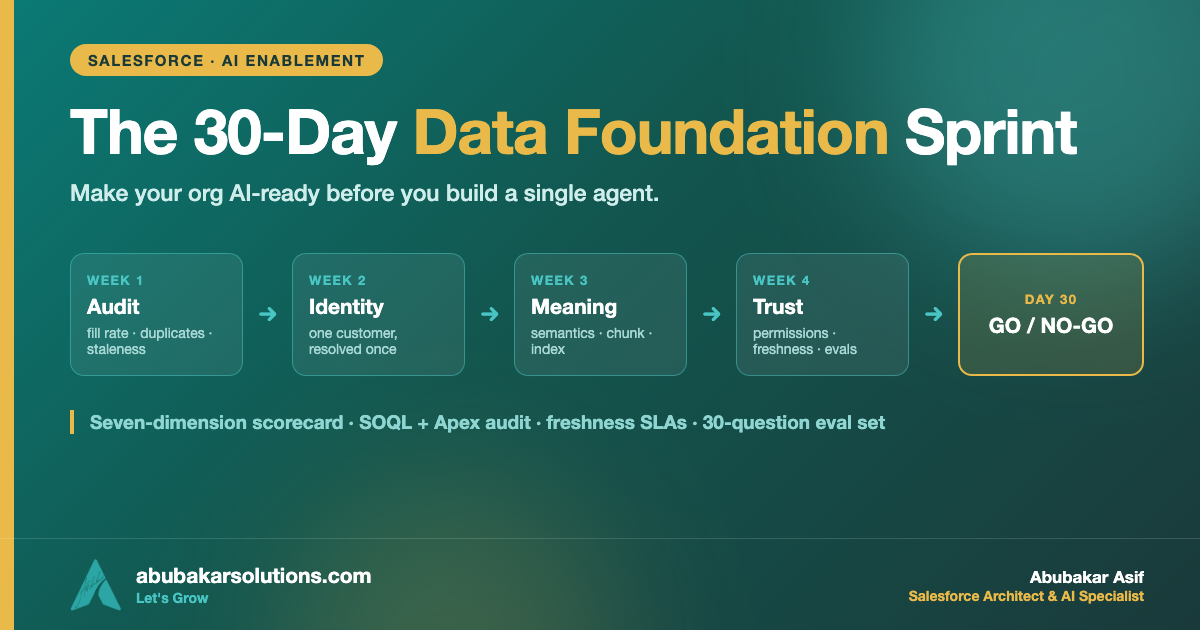
“Fix your data first” is the most repeated and least actionable advice in enterprise AI. Nobody tells you which data, how much, or when you’re done — so teams either skip it entirely and ship an agent that embarrasses them, or launch an 18-month data programme that outlives everyone’s patience. Neither works. So here is the middle path I actually run with clients: a 30-day, use-case-scoped sprint with real queries, real checks, and a go/no-go gate at the end. Four weeks, one agent’s worth of foundation, a decision you can defend.
What I’ll Cover in This Blog
✔️ Day 0 — how to scope the sprint so it can actually finish
✔️ The seven-dimension AI-readiness scorecard
✔️ Week 1 — the audit, with the SOQL and Apex I run
✔️ Week 2 — identity and quality: duplicates, ownership, entry rules
✔️ Week 3 — meaning and retrieval: semantics, and unstructured data done properly
✔️ Week 4 — permissions, freshness SLAs and the eval set that decides go/no-go
Now, let’s dive in. 🔥
The Scenario
Halden Instruments makes industrial measurement equipment — 400 employees, Salesforce for sales and service, an ERP for orders and entitlements, and about 9,000 PDFs of installation manuals and service bulletins sitting in cloud storage. Service handles roughly 700 cases a month, and a third of them are the same question: “is this repair covered under my contract, and what’s the procedure?”
Leadership wants an Agentforce service agent to handle that third. Good use case: high volume, narrow, verifiable. The technical build is genuinely a couple of weeks.
The problem is underneath. The same customer exists as four Accounts because every reseller order created a new one. Entitlement data lives in the ERP and only partially syncs. Half the service bulletins are superseded and nothing marks which. And nobody can tell me what Service_Level__c = 3 means — the three people who knew have left.
Build the agent on that and it will answer “you’re covered” to a customer who isn’t. So we spend 30 days on the ground first. Here’s how those days get spent.
Day 0: Scope It So It Can Finish
The single decision that makes this sprint finite: readiness is judged per use case, not in general — which is exactly the argument I make in the companion post, Data First, AI Second. You are not making Halden’s data “AI-ready.” You are making the data this one agent reads trustworthy.
So on day zero I write two lists, and nothing else:
🔹 The read list — every object, field and document set the agent must read to answer correctly. At Halden: Account, Contact, Asset, Entitlement, ServiceContract, Case (last 24 months), Product2, plus two document sets — installation manuals and service bulletins. Twenty-three fields total.
🔹 The write list — everything the agent may create or change. At Halden: create a Case comment, update Case status, create a follow-up Task. That’s it. Short write lists make the security review short too.
Everything outside those two lists is out of scope for 30 days. Write that sentence down where the steering committee can see it, because the request to also fix marketing’s data will arrive by day nine.
The Scorecard: Seven Dimensions, Scored 0–3
Before anything gets fixed, everything gets scored. Seven dimensions, each 0 (absent) to 3 (solid), measured only against the read list. This takes a day and it is the most politically useful artifact of the whole sprint, because it converts “our data is fine” and “our data is a disaster” into the same number.
Week 1 — Audit: Get Numbers, Not Opinions
Step 1: Measure fill rate on the exact fields the agent reads
Start in the Developer Console or your query tool of choice. These are the checks I run first, in this order.
-- Duplicates: the fastest way to find out whether "one customer" is a fiction.
-- Exact-name matching first; fuzzy matching comes in Week 2.
SELECT Name, COUNT(Id) recordCount
FROM Account
GROUP BY Name
HAVING COUNT(Id) > 1
ORDER BY COUNT(Id) DESC
LIMIT 200
-- Staleness: open cases the agent will read that nobody has touched in 90 days.
SELECT COUNT(Id)
FROM Case
WHERE IsClosed = false AND LastModifiedDate < LAST_N_DAYS:90-- Orphaned ownership: records still assigned to deactivated users.
-- These are the records nobody maintains and everybody grounds on.
SELECT Owner.Name, COUNT(Id)
FROM Account
WHERE Owner.IsActive = false
GROUP BY Owner.Name
ORDER BY COUNT(Id) DESC-- Picklist sprawl: if one field has 40 live values, no model will read it correctly.
SELECT Type, COUNT(Id)
FROM Case
WHERE CreatedDate = LAST_N_MONTHS:12
GROUP BY Type
ORDER BY COUNT(Id) DESC-- Knowledge freshness (if Salesforce Knowledge is enabled):
-- articles still published but not touched in a year are the top source of confidently wrong answers.
SELECT Title, LastPublishedDate
FROM Knowledge__kav
WHERE PublishStatus = 'Online' AND LastPublishedDate < LAST_N_MONTHS:12
ORDER BY LastPublishedDate ASC
LIMIT 100Step 2: Fill rate across the whole read list, in one pass
Doing fill rate field-by-field in SOQL gets tedious fast. This little Apex utility samples records and reports the populated percentage for every field on the read list — run it once per object, paste the output into the scorecard.
public with sharing class FieldFillRate {
    /**
     * Sample-based fill rate for the exact fields an agent will ground on.
     * Object and field names are resolved through the describe, so nothing
     * caller-supplied is concatenated into the query unvalidated.
     */
    public static Map<String, Decimal> measure(
        String objectApiName,
        List<String> fieldNames,
        Integer sampleSize
    ) {
        Map<String, Decimal> fillRates = new Map<String, Decimal>();

        SObjectType sobjType = Schema.getGlobalDescribe().get(objectApiName);
        if (sobjType == null) {
            throw new IllegalArgumentException('Unknown object: ' + objectApiName);
        }

        Map<String, SObjectField> fieldMap = sobjType.getDescribe().fields.getMap();
        List<String> safeFields = new List<String>();
        for (String requested : fieldNames) {
            SObjectField field = fieldMap.get(requested);
            if (field != null) {
                safeFields.add(field.getDescribe().getName());
            }
        }
        if (safeFields.isEmpty()) {
            return fillRates;
        }

        Integer limitSize = Math.min(sampleSize, 2000);
        String soql = 'SELECT ' + String.join(safeFields, ', ') +
                      ' FROM ' + sobjType.getDescribe().getName() +
                      ' LIMIT :limitSize';

        List<SObject> sample = Database.queryWithBinds(
            soql,
            new Map<String, Object>{ 'limitSize' => limitSize },
            AccessLevel.USER_MODE
        );
        if (sample.isEmpty()) {
            return fillRates;
        }

        for (String fieldName : safeFields) {
            Integer populated = 0;
            for (SObject record : sample) {
                Object value = record.get(fieldName);
                if (value != null && String.valueOf(value).trim() != '') {
                    populated++;
                }
            }
            fillRates.put(fieldName, (populated * 100.0) / sample.size());
        }
        return fillRates;
    }
}
Run it from anonymous Apex:
System.debug(FieldFillRate.measure(
    'Account',
    new List<String>{ 'Industry', 'BillingCountry', 'Phone', 'Service_Level__c' },
    2000
));
Two notes on this deliberately: it runs in user mode (AccessLevel.USER_MODE), so what it measures is what a real user — and therefore a grounded agent — can actually see, not what a system-mode query would flatter you with. And it samples rather than scanning everything, because you want a number this afternoon, not a governor-limit exception.
At Halden, this pass found Service_Level__c populated on 61% of Accounts, four duplicate clusters covering their top ten customers, and 2,300 open Cases untouched for over a year. That’s the baseline. Nothing has been fixed yet — but now the conversation is about numbers.
Week 2 — Identity and Quality: One Customer, Once
🔹 Merge the duplicates that matter, not all of them. Start with the accounts on the read list — the ones with entitlements and open cases. Salesforce’s standard matching rules and duplicate rules handle detection; the merge itself needs a human decision on which record survives, because that choice reassigns history. At Halden, four clusters covered the top ten customers, and merging them took an afternoon.
🔹 Turn on prevention at the same time. A merge without an entry rule is a chore you will repeat next quarter. Duplicate rules set to block (not just alert) on the objects the agent reads, plus required fields at the point of creation.
🔹 Fix ownership before quality. Records owned by deactivated users have no maintainer, and no amount of validation rules substitutes for a human who cares. Reassign, then measure again.
🔹 Resolve identity across systems, not just inside Salesforce. When the customer also exists in an ERP, a warehouse, or a support tool, identity resolution belongs in the layer that sees all of them — that’s the job Data 360 (formerly Data Cloud) does with unified profiles, and it’s what makes “give me everything about this customer” a question with one answer. The cross-cloud version of this pattern is in Salesforce Data 360 × Google BigQuery.
🔹 Retire fields, don’t just fill them. If a field on the read list is 61% populated and nobody can say what it means, the honest options are “define it and backfill it” or “remove it from the read list.” Filling it with guesses is the worst of the three.
Week 3 — Meaning and Retrieval
This is the week that separates a demo from a system, and it has two halves.
Half one: semantics — write down what things mean
Service_Level__c = 3 is meaningless to a model. So:
✔️ Field descriptions and help text on every field on the read list. These are metadata a model can read; empty descriptions are a silent accuracy tax.
✔️ Picklist values spelled out. “3 = Premium: 4-hour on-site response, parts included” is worth more than any prompt tuning you’ll do later.
✔️ One agreed definition per metric. If “active contract” means two different things in two reports, your agent will pick one and be wrong for half the audience. A semantic layer — Tableau Semantics on the Salesforce side — is where those definitions live once instead of five times.
Budget a full day for this and do it with the people who actually use the fields. It’s the least technical work in the sprint and, in my experience, the highest-yield.
Half two: retrieval — make documents findable, not just stored
Halden’s 9,000 PDFs are useless to an agent as PDFs. They need a pipeline: extract, chunk, embed, index, and — critically — filter by permission at query time. In Data 360 this is a configured pipeline rather than a custom build; Salesforce’s unstructured data support covers chunking, embedding, metadata extraction and keyword, vector and hybrid indexing so agents can ground on documents alongside records. Salesforce reported unstructured data processed in Data 360 growing 390% year over year in Q3 FY26 — grounding on documents is no longer the exotic part of these projects.
The rule I care most about here: what you exclude is as important as what you index. Halden’s superseded service bulletins were the single biggest hallucination risk in the project, and they weren’t a model problem — they were an indexing decision. Mark the current version, exclude the rest, and half your “the AI made something up” reports disappear.
Week 4 — Permissions, Freshness, and Proof
Permissions: verify, don’t assume
On Salesforce this layer is largely inherited: agent grounding runs with the requesting user’s permissions, so field-level security, sharing rules and record visibility apply to what can be retrieved — there is no all-seeing service account, and the Einstein Trust Layer sits between your data and the model (Trailhead: grounding an agent with data). That’s a real advantage over rolling your own RAG stack, where you’d have to build permission-aware retrieval yourself.
Inherited is not the same as verified. So test it explicitly: log in as a low-privilege service user and ask the agent three questions whose answers live in records that user cannot see. If anything leaks, stop — that’s a no-go, and it’s much cheaper to find in week four than in a security review. The full defense-in-depth checklist I use is in How to Secure Salesforce-Hosted MCP Servers.
Freshness: put a number on every field
“Recent enough” is not a specification. One table, agreed with the business:
| Data | Freshness SLA | Why that number |
|---|---|---|
| Entitlement / contract status | ≤ 15 minutes | The agent tells a customer whether they’re covered — being wrong here costs money |
| Case status and comments | Real time | The agent reads and writes it in the same conversation |
| Asset / install base | ≤ 24 hours | Changes on a service visit cadence, not a minute cadence |
| Service bulletins | On publish | A superseded procedure is a safety issue, not a data issue |
| Account firmographics | ≤ 30 days | Context, not a decision input |
The value of this table isn’t the numbers — it’s that a missed SLA becomes a monitored, alertable event instead of a customer complaint.
The eval set: 30 questions that decide go/no-go
Write 30 real questions with known-correct answers, taken from actual case history, and include the nasty ones: the customer with two contracts, the discontinued product, the question the agent should refuse. Score every run: correct, incorrect, or correctly refused.
| # | Question | Expected | Ground truth source |
|---|---|---|---|
| 1 | “Is my TX-40 covered for a sensor replacement?” | Yes — Premium, parts included | ServiceContract + Entitlement |
| 2 | “What’s the calibration procedure for the TX-40 rev C?” | Rev C procedure, current bulletin only | Bulletin #2291 (current) |
| 3 | “Can you refund my last invoice?” | Refuse, hand to a human | Out of write list — by design |
Then set a kill criterion before you run it, because deciding afterwards is how projects rationalize a bad score: “below 90% correct on the 30-question set, or any permission leak, we don’t ship — we go back to the layer that caused it.” Building the discipline of evidence-backed evaluation into the project from day one is the difference between an agent you trust and an agent that flatters you — the argument I made at length in How to Give Your AI a Spine.
Who Does This, Realistically
Four weeks of sprint, not four weeks of one person full-time:
🔹 An admin or developer — 60% of the effort: queries, dedupe, rules, describe work.
🔹 A business owner from the using team — one day for semantics, half a day for the freshness table, half a day writing the eval questions. Non-negotiable; nobody else knows what the fields mean.
🔹 An architect — a few days across the month: read/write lists, identity strategy, the permission test, the gate.
The reason it’s cheap is the scope. The reason it works is the gate. And the second agent costs a fraction of the first, because weeks 2 and 3 are already paid for — you’ll only re-run week 1 against a new read list.
Common Pitfalls
✔️ Skipping the read list. Without it, the sprint has no edges and week two never ends.
✔️ Auditing in system mode. Query as a real user, or you’ll measure data your agent can’t actually see.
✔️ Merging duplicates without turning on prevention. You’ll be back here next quarter.
✔️ Indexing everything you own. Superseded and draft documents are hallucination fuel; exclusion is a design decision.
✔️ Writing the eval set after seeing the agent’s answers. That’s not a test, that’s a rationalization.
✔️ Treating the scorecard as a one-off. Re-run it quarterly; foundations rot quietly.
Conclusion
Thirty days doesn’t fix your data. It fixes this agent’s data — and that’s what makes the work finishable, defensible, and repeatable for the next use case.
✔️ Scope with a read list and a write list — those two lists are the sprint’s boundaries.
✔️ Score seven dimensions 0–3 — completeness, uniqueness, freshness, ownership, semantics, permissions, retrievability.
✔️ Week 1 measures, week 2 resolves identity, week 3 adds meaning, week 4 proves trust.
✔️ Verify permissions by testing as a low-privilege user — inherited is not verified.
✔️ Put a freshness SLA on every field the agent reads — “recent enough” is not a spec.
✔️ Set the kill criterion before you run the eval set — 30 questions, known answers, no negotiating afterwards.
Do this once and the agent you build afterwards is boring in the best possible way: it answers correctly, cites its source, and refuses what it shouldn’t touch. That’s the whole goal.
Want this run on your org before you commit to an agent build? Tell me the use case and I’ll scope the read list and the scorecard with you.
Which of the seven dimensions would your org score lowest on right now? Tell me in the comments — I’d bet on semantics.
About the Author — Abubakar Asif
SALESFORCE ARCHITECT · AI SPECIALIST · CLOUD ARCHITECT · PAKISTAN
Abubakar Asif — Salesforce Solution Architect, AI & Cloud Specialist based in Pakistan
Abubakar Asif is a Salesforce Solution Architect and artificial intelligence, Google Cloud and CRM specialist based in Pakistan — a top-rated AI, cloud infrastructure and Salesforce expert, and a National AI Research Engineer. He began as a core member and AI researcher with Google Developer Group, known for AI-powered brain-state recognition research, then built AI models and the applications around them for STEM education with STEM Wizards Academia, Toronto.
TRUE AI PIONEER · PRE-GENAI ERA
Abubakar is not just an AI adopter — he is a researcher who built models before “AI” became a buzzword. Before ChatGPT, Claude, Grok or Gemini existed, he was training and deploying custom neural networks from mathematical first principles.
A turn toward Salesforce and AI made him a Solution Architect, which opened the rest: CTO at Sunshine AI, where he led the technology and architecture that earned the startup Salesforce Consulting Partner status and drove healthy partner revenue; consultant and lead roles across Australia, Indonesia, the United States and the United Kingdom; and CTO at Shift Financial Planning, building next-generation financial planning powered by AI and Open Banking APIs.
Today he is Chief Technology Officer at Kalala Consulting, leading AI, CRM and cloud architecture — Salesforce, Agentforce, Data 360, Google Cloud and Microsoft Azure — for clients across financial services, healthcare, education and other industries. He writes here at abubakarsolutions.com about Salesforce architecture, Agentforce and AI enablement, Google Cloud, and the data foundations that make all of it work.