Almost every discovery call I take follows the same script. The CEO is already convinced AI matters. A few people on the team use ChatGPT for emails. Somebody produced an “AI strategy” document last year that nobody has opened since. And when I ask the only question that matters — what do you want to build? — the answer is some version of “we don’t know, that’s why we’re talking to you.”
Here’s the thing: that answer isn’t a failure. It’s a diagnosis. These companies don’t have a building problem. They have a knowing-what-to-build problem, and the reason is structural — it’s buried in how their operation stores and moves information. This post is the process I use to dig it out.
What I’ll Cover in This Blog
✔️ Data silos — why nobody can answer “what should we automate?”
✔️ The two maps every business has, and why systems built from the wrong one get rejected
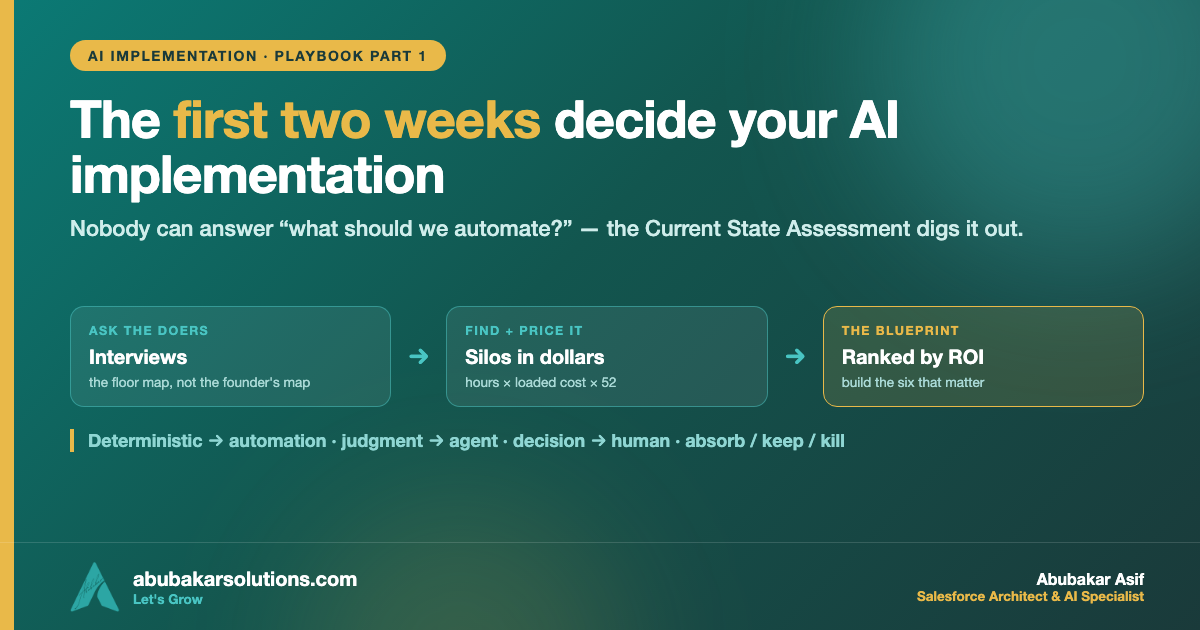
✔️ The Current State Assessment: interviews, the silo inventory, and pain quantified in dollars
✔️ The engagement signal that predicts adoption before a single thing is built
✔️ Three architecture decisions that come before any build: one write path, automation-vs-agent-vs-human, and absorb-keep-kill
Now, let’s dive in! 🔥
The Scenario
Meridian Facilities Group is a 140-person facilities-management company. They run Salesforce as their CRM — roughly 60% accurate by their own admission — plus a project tool, an accounting system, two form builders, and sixteen other subscriptions nobody can fully list. The real operational truth of the business lives in a spreadsheet their ops lead Maria maintains, and in the memories of three tenured coordinators who can never take vacation at the same time.
Their best people lose 8–15 hours a week re-entering data, chasing statuses, and rebuilding the same reports. Leadership wants “AI across the business.” Nobody can say what that means. Sound familiar? Let’s find out why.
Data Silos: Why Nobody Can Answer “What Should We Automate?”
A data silo is any place where operational information lives that other systems can’t see. Your CRM is a silo. Your project tool is a silo. Maria’s spreadsheet is usually the biggest silo of all.
Nobody builds silos on purpose. They form because every department solved its own problem with its own tool at a different point in the company’s growth — sales bought a CRM in year two, operations adopted a project tool in year three, finance ran its own system from day one. Each purchase made sense in isolation. Five years later the same client exists in six systems with six slightly different versions of the truth, and no one ever decided that.
The cost shows up in four patterns I find in nearly every assessment:
🔹 Re-entry. The same information gets typed by hand into two, three, or four systems — and every keystroke is a chance for a typo that becomes someone’s afternoon.
🔹 Version conflict. When two systems disagree about a client’s status, a human has to stop and adjudicate. That reconciliation repeats across every client, every week.
🔹 Reporting lag. Questions that should take thirty seconds take two days, because answering them means manually pulling from four sources and reconciling the differences.
🔹 Tribal knowledge. The most important system in the company is the memory of a few tenured employees. The operation stalls when they’re out and breaks when they leave.
And here’s why this matters for AI specifically: AI makes silos more dangerous, not less. An agent operating on a third of the picture won’t tell you it only has a third of the picture — it will produce a fluent, confident answer built on a third of the picture. Fragmented data fed into AI generates polished mistakes at scale, which is in some ways worse than the manual chaos, because the manual version at least announced itself. I’ve written about that multiplier effect in Data First, AI Second — this post is about what you do before even that: finding the silos in the first place.
The Two Maps
Every business has two maps of itself, and only one of them is real.
The founder’s map describes how the business is supposed to run — the clean pipeline from the pitch deck. The floor map describes how the work actually gets done: every workaround, every unofficial spreadsheet, every extra step that exists because something broke in 2023 and the patch became permanent.
No founder fully holds the floor map. That’s not a criticism — it’s just what happens when a business grows past the point where one person can see all of it. But it has a hard consequence: systems designed from the founder’s map get rejected. The team feels the mismatch on day one and quietly routes around the new system. Systems designed from the floor map get adopted, because they match the work as it actually happens.
The only way to get the floor map is to go collect it. That’s what the Current State Assessment is for.
The Current State Assessment: Two Weeks, No Shortcuts
Every implementation I run starts with a Current State Assessment — two weeks minimum, and there is no way around it. Any provider who offers to “audit your business” in a single 45-minute call is giving you a sales presentation, not an assessment. You cannot design a system for an operation you don’t understand, and two weeks is what understanding actually takes.
Step 1: Stakeholder interviews — the doers, never just the managers
I interview 60–90 minutes per person, minimum one person per function — and critically, the people who do the work, not only the people who manage it. The ops manager and the coordinator underneath them will describe the same process differently, and the coordinator’s version is the accurate one.
The interview is a walkthrough, not a survey. The questions that earn their keep:
🔹 Walk me through this process end to end, including the steps that feel too small to mention.
🔹 Where does information come from when you start, and where do you send it when you’re done?
🔹 What do you type or copy by hand more than once?
🔹 Where does work sit and wait — and who is it waiting on?
🔹 What do you double-check before you trust a number in a system?
🔹 What workaround have you built that nobody officially knows about?
🔹 If volume doubled next quarter, what would break first?
That last question is the single most valuable one in the whole assessment. People know exactly what would break first — they work next to that weakness every day, and in most companies nobody has ever asked them.
Always follow up asynchronously two days later. People reliably remember the important details late: the forgotten step, the unmentioned spreadsheet, the exception that happens “only sometimes” and turns out to be 20% of cases.
Step 2: The silo inventory
In parallel, catalog every place data lives — every tool, every spreadsheet, every shared drive, every inbox quietly functioning as a database. For each one: what it holds, who writes to it, who reads it, what it overlaps with, and what it costs per month.
Two numbers consistently shock leadership: the total count (usually 15–25 tools) and the monthly spend, a meaningful share of which goes to software used by one person or by nobody at all.
Step 3: Pain quantification — their numbers, never industry averages
Every bottleneck gets a dollar figure attached, pulled from their own operation. The math is deliberately simple:
🔹 Labor: hours per week on the manual work × loaded cost of the people doing it × 52.
🔹 Errors: what a mistake costs when it happens × how often it happens.
🔹 Throughput: the deals that stalled, the projects that slipped, the capacity the team couldn’t take on.
At Meridian, one re-entry loop — leads re-typed from web forms into Salesforce and then into Maria’s spreadsheet — worked out to roughly $38,000 a year in labor alone. Once a bottleneck carries a verified figure like that, prioritization stops being a debate. The room resolves itself.
Step 4: The blueprint
The deliverable is one document: the visual process maps of the current state, the silo inventory, the quantified pain list, the opportunities ranked by projected ROI against build complexity, the proposed future-state architecture, and a phased plan with budget ranges.
The ranking matters more than the list. Generating forty automation ideas is easy. The value is knowing which six matter, which three come first, and which ten sound impressive but would return almost nothing.
The Signal That Predicts Everything
Something else happens during those two weeks, and it predicts the entire engagement: I watch the engagement signal.
Strong signal looks like stakeholders arriving prepared, follow-ups answered within a day, and people volunteering pain points without prompting. Weak signal looks like rescheduled interviews, one-line answers, and a founder who wants to skip ahead to a demo.
I’ve learned to treat weak signal as a disqualifier. How a company behaves during the assessment is how it will behave during the build — and a company that treats the assessment as a formality will let a beautifully engineered system sit unused. Adoption isn’t decided at go-live. It’s decided in week one, when the team either becomes invested or doesn’t.
Three Architecture Decisions Before Anyone Builds Anything
The assessment tells you what’s true. Before the build starts, three design decisions turn that truth into an architecture. (If you want the deeper framework for the platform side of this, Salesforce’s own Well-Architected guidance is the best free resource in the ecosystem.)
1️⃣ One write path per entity
Design the data model first — the core entities of the business (clients, projects, orders, jobs), their fields, their relationships. Then apply the rule that kills silos permanently: every piece of data has exactly one place where it gets created and one path through which it gets updated. Everything else reads from that source. The moment two systems can both write the same record, you have rebuilt the exact problem you paid to solve, just on newer software.
2️⃣ Automation, agent, or human — classify every piece of work
Adding AI indiscriminately is a failure pattern all of its own. Every piece of work in the future state gets one of three labels:
🔹 Deterministic work → automation. If the rule can be written down completely — “when a form comes in, create the record, assign the owner, notify the channel” — it’s a Flow or an automation with no AI involved. None is needed, and adding it would inject cost and unpredictability into something that should run identically every time.
🔹 Judgment work → agent. Classifying an inbound email, drafting a document from context, answering questions against a knowledge base — interpretation and generation belong to agents.
🔹 Decision work → human, with the system doing the prep. Approving a quote, accepting a client, pricing an exception — these stay human. The system’s job is to assemble everything needed and present it, turning a forty-minute research exercise into a one-minute review.
A meaningful share of every “AI wishlist” turns out to be deterministic. That discovery alone regularly cuts the projected complexity of a build by a third.
3️⃣ Absorb, keep, or kill — the fate of every existing tool
“Implementation” is widely misread as “build everything from scratch.” It isn’t. Every tool from the silo inventory runs through a three-outcome decision:
🔹 Absorb. The tool does something the core platform should own — internal trackers, form builders, project add-ons, reporting bolt-ons. The function gets rebuilt into the operating system and the tool gets cancelled. This is where the SaaS consolidation savings live.
🔹 Keep. The tool is genuinely excellent and worth connecting to rather than replacing. Accounting software almost always stays, as do email, calendars, and industry systems that carry regulatory weight. The platform integrates with them and becomes the layer that makes them behave like one system.
🔹 Kill. Redundant, barely used, or duplicating something else. Cancel it, rebuild nothing, and watch nobody notice.
Running every tool through that tree effectively scopes the build on its own — and it’s why companies who arrive braced for a scorched-earth rebuild usually leave relieved.
Common Pitfalls
✔️ Starting with the tools. “Should we buy X?” is the last question in the sequence, not the first. Architecture decides tools, never the reverse.
✔️ Interviewing only managers. The floor map lives one level down. The coordinator’s version of the process is the true one.
✔️ Accepting industry-average ROI numbers. If the pain isn’t quantified from their operation, the prioritization is fiction and the business case won’t survive contact with the CFO.
✔️ Skipping the async follow-up. The most important detail of every interview arrives two days later, unprompted.
✔️ Ignoring weak engagement signal. A company that reschedules its own assessment will not adopt what you build. Walk away or fix the sponsorship first.
✔️ Pointing AI at the mess to “figure it out.” An agent on fragmented data produces polished mistakes at scale — I covered why in AI Won’t Fix Your Mess.
Conclusion
The overwhelm and the failure in AI implementations come from the same place: attempting the project without a process. The first two weeks are the process.
✔️ “We don’t know what to build” is a structural symptom — the answer is buried in silos, and the assessment digs it out.
✔️ Design from the floor map, not the founder’s map — adoption follows the map that matches reality.
✔️ Interview the doers, follow up async, and always ask what breaks first when volume doubles.
✔️ Quantify pain in their dollars — a verified $38K/year re-entry loop ends every prioritization debate.
✔️ Classify before you build: deterministic → automation, judgment → agent, decision → human with prep.
✔️ Absorb, keep, or kill every tool — the best implementations delete more than they create.
The companies that win with AI don’t have better tools than you. They have a truer map. In part two of this pair, I cover what happens after the blueprint: build order, the migration decision everyone overthinks, and the one metric that matters after go-live — Go-Live Is Not the Finish Line.
Staring at 20 tools, one overloaded spreadsheet, and an AI mandate with no map? Tell me what would break first if your volume doubled — that’s where the assessment starts.
What’s the workaround in your company that nobody officially knows about? Tell me in the comments — anonymously if you must.
About the Author — Abubakar Asif
SALESFORCE ARCHITECT · AI SPECIALIST · CLOUD ARCHITECT · PAKISTAN
Abubakar Asif — Salesforce Solution Architect, AI & Cloud Specialist based in Pakistan
Abubakar Asif is a Salesforce Solution Architect and artificial intelligence, Google Cloud and CRM specialist based in Pakistan — a top-rated AI, cloud infrastructure and Salesforce expert, and a National AI Research Engineer. He began as a core member and AI researcher with Google Developer Group, known for AI-powered brain-state recognition research, then built AI models and the applications around them for STEM education with STEM Wizards Academia, Toronto.
TRUE AI PIONEER · PRE-GENAI ERA
Abubakar is not just an AI adopter — he is a researcher who built models before “AI” became a buzzword. Before ChatGPT, Claude, Grok or Gemini existed, he was training and deploying custom neural networks from mathematical first principles.
A turn toward Salesforce and AI made him a Solution Architect, which opened the rest: CTO at Sunshine AI, where he led the technology and architecture that earned the startup Salesforce Consulting Partner status and drove healthy partner revenue; consultant and lead roles across Australia, Indonesia, the United States and the United Kingdom; and CTO at Shift Financial Planning, building next-generation financial planning powered by AI and Open Banking APIs.
Today he is Chief Technology Officer at Kalala Consulting, leading AI, CRM and cloud architecture — Salesforce, Agentforce, Data 360, Google Cloud and Microsoft Azure — for clients across financial services, healthcare, education and other industries. He writes here at abubakarsolutions.com about Salesforce architecture, Agentforce and AI enablement, Google Cloud, and the data foundations that make all of it work.