In part one I made the case for the 80/20 rule of AI automation: automate the predictable 80%, and design the other 20% properly. This post is the second half of that sentence. Because “leave it to human judgment” is not a design — it’s a wish. If the exception path is an afterthought, exceptions leak: they get forced through the wrong branch, silently dropped, or dumped into someone’s inbox with zero context. The messy 20% is where automations go to die, and it’s also where the good ones earn their keep. Here’s how I build that path, step by step.
What I’ll Cover in This Blog
✔️ The anatomy of a proper exception path: detect → context → route → resolve → feed back
✔️ Three human-in-the-loop patterns, and when each one applies
✔️ How to build this in Salesforce with Flows, queues, and Omni-Channel
✔️ The graduation loop: how exceptions become rules over time
✔️ The anti-patterns that quietly kill automations
Now, let’s dive in! 🔥
The Scenario, Continued
Back to Corvane Logistics from part one. We had deleted 28 of their 41 automation branches and promised that everything unusual would go “to a human.” The first version of that promise was an email alert to a shared inbox. Within two weeks it was failing exactly like the branches had — exceptions sat unread, context was missing, and the pricing specialist spent her mornings reconstructing what the automation had already known.
The lesson: an exception path is a system, not a notification. So we built it like one.
The Anatomy of an Exception Path
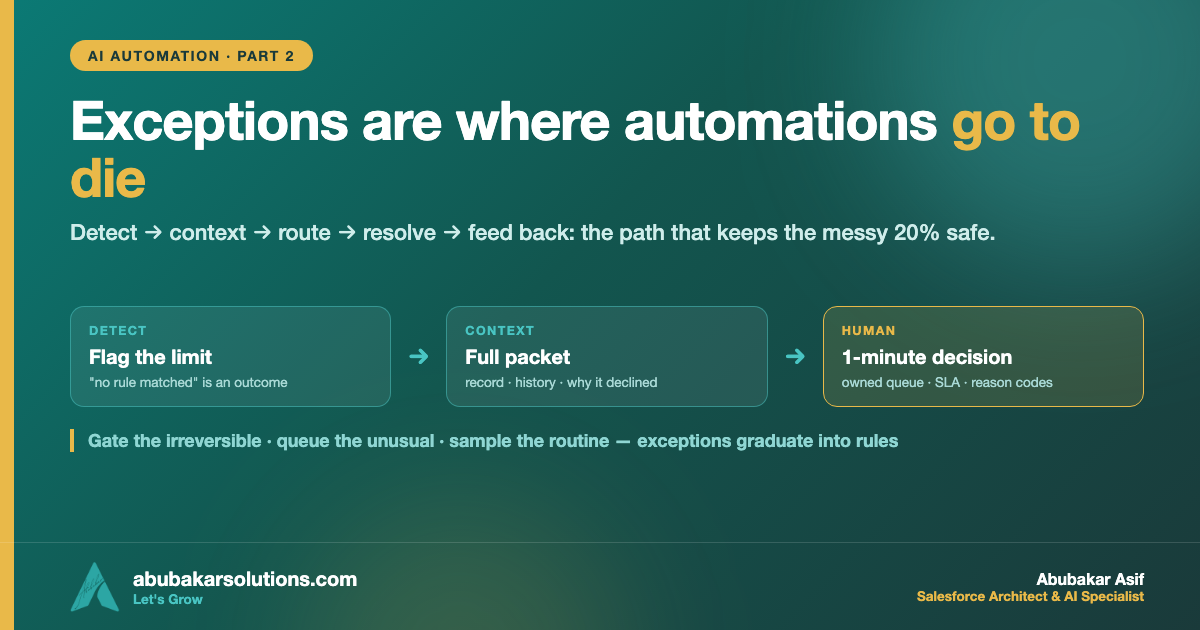
Every exception path that survives contact with production has the same five stages:
🔹 1. Detect. “This doesn’t match a clean rule” is a first-class outcome, not an error. The automation’s job is to notice its own limits — an unmatched condition ends in a deliberate exception, never in a best-guess branch.
🔹 2. Capture context. At the moment of detection, the system assembles the packet: the request, the record, the history, the data it used, and — critically — why it declined. The human should never have to re-investigate what the machine already knew.
🔹 3. Route. The exception goes to a place with an owner: a queue with capacity, skills, and an SLA. Not an inbox. Not a channel where it scrolls away. A queue someone is accountable for clearing.
🔹 4. Resolve. The human makes the call — approve, price, reject, escalate — in minutes, not hours, because the packet is complete. The resolution is recorded as data, not prose.
🔹 5. Feed back. Resolutions are reviewed on a cadence. Patterns get spotted. And some exceptions graduate into rules — more on that below.
Three Human-in-the-Loop Patterns
“A human in the loop” is three different designs, and picking the wrong one either slows the 80% down or lets the 20% slip through. The variable that decides: how expensive is a wrong action, and can it be undone?
1️⃣ The approval gate — human decides before the action
The automation prepares everything and stops. A human approves, then the action fires. Use it when the action is consequential and hard to reverse: sending the negotiated quote, issuing the refund, changing the contract. The cost is latency on every gated item — so gate only what genuinely deserves it.
2️⃣ The exception queue — human handles after detection
The default pattern, and the one from part one. The 80% flows straight through untouched; only detected exceptions stop for a human. Use it when the routine cases are safe to auto-complete and the unusual ones are identifiable. This is the pattern that preserves speed and judgment.
3️⃣ Review sampling — human audits after the fact
The automation completes everything, and a human reviews a sample on a cadence — 5% of outputs, every complaint, every edge the monitors flag. Use it when actions are low-risk and reversible, and you mainly need drift detection. This is also the right first pattern for AI-generated output you think you trust: sample it for a month before you stop looking.
Building It in Salesforce
If Salesforce is your system of record, everything above maps to platform features you already own — no new tools required. (Salesforce’s own Well-Architected guidance is worth reading alongside this.)
🔹 Detect — in Flow, make the default outcome of every decision element an explicit “no rule matched” path. Never let the final else branch do something; let it flag something.
🔹 Capture context — have that path create an Exception record (a custom object earns its keep here): the triggering record, the inputs the Flow evaluated, and a picklist reason code. Reason codes matter — they’re what makes the feedback loop queryable later.
🔹 Route — assign Exception records to a queue, and if response time matters, push them through Omni-Channel with skills-based routing so the right specialist gets the right exception. This is the same handoff discipline that makes an AI agent trustworthy: the human receives the case with the full transcript and context, never cold.
🔹 Resolve — for the approval-gate pattern, use a standard approval process or a screen Flow that presents the packet and captures the decision as fields, not free text.
🔹 Feed back — a report on Exception records grouped by reason code, reviewed monthly. That one report is the entire “learning system,” and it costs you a Tuesday afternoon.
The Graduation Loop: When Exceptions Become Rules
Here’s what makes a well-designed 20% pay compound interest: exceptions carry information. Every resolved exception is a labeled example of how your business actually decides things.
On a monthly cadence, ask three questions of the exception report:
1️⃣ Which reason code keeps recurring? If “oversized cargo, standard lane” showed up 30 times and the specialist priced it the same way 28 times — that’s not an exception anymore. That’s a rule you haven’t written down yet.
2️⃣ Can the rule now be written completely? Run it through the one-question test from part one. If yes, it graduates: the branch gets built, and the 80% becomes the 81%.
3️⃣ **What should stop being automated?** Graduation runs both ways. A branch that keeps producing corrections gets demoted back to the queue. No shame — that’s the system telling you where the line really is.
This is how the automation grows safely: not by guessing at edge cases up front, but by promoting only the exceptions that proved themselves repetitive. The same monthly review that keeps adoption alive after go-live is where this conversation belongs.
The Anti-Patterns That Kill Automations
Every one of these looks reasonable on the day it’s built:
✔️ The silent failure. The exception branch logs to a place nobody reads. Rule: if an automation fails and nobody is alerted, it will fail for three weeks before a customer tells you.
✔️ The endless retry. The automation retries the unmatched case forever instead of escalating. Retries fix transient errors, not judgment calls.
✔️ The context-free handoff. “Case needs attention” with a record link. The human re-investigates from zero, and the queue becomes the bottleneck the automation was meant to remove.
✔️ The unowned queue. An exception queue with no named owner and no SLA is a shared inbox with better branding.
✔️ Prose resolutions. Decisions recorded as free-text comments can’t be counted, so nothing ever graduates. Reason codes or it didn’t happen.
✔️ The permanent approval gate. Everything gated “for safety” — so approvers rubber-stamp, the gate becomes theater, and latency is all you bought.
Conclusion
The other 20% is where your automation earns trust or loses it:
✔️ Five stages, always: detect → capture context → route → resolve → feed back.
✔️ Detection is a feature — “no rule matched” must be a first-class outcome, never a best-guess branch.
✔️ Pick the loop deliberately: gate the irreversible, queue the unusual, sample the routine.
✔️ In Salesforce it’s all standard kit: Flow default paths, an Exception object with reason codes, queues + Omni-Channel, approval processes, one monthly report.
✔️ Run the graduation loop — proven exceptions become rules, unstable branches demote back, and the 80% grows safely.
✔️ Kill the anti-patterns early — silent failures, context-free handoffs, unowned queues, and gates that became theater.
Automate the predictable. Design the exceptional. And let the exceptions teach the system where the line really is.
Have an automation whose exceptions land in a shared inbox right now? Tell me what’s in that inbox and we’ll design the path it actually needs.
What’s the best exception your automation ever caught — or the worst one it forced through? Tell me on LinkedIn.
About the Author — Abubakar Asif
SALESFORCE ARCHITECT · AI SPECIALIST · CLOUD ARCHITECT · PAKISTAN
Abubakar Asif — Salesforce Solution Architect, AI & Cloud Specialist based in Pakistan
Abubakar Asif is a Salesforce Solution Architect and artificial intelligence, Google Cloud and CRM specialist based in Pakistan — a top-rated AI, cloud infrastructure and Salesforce expert, and a National AI Research Engineer. He began as a core member and AI researcher with Google Developer Group, known for AI-powered brain-state recognition research, then built AI models and the applications around them for STEM education with STEM Wizards Academia, Toronto.
TRUE AI PIONEER · PRE-GENAI ERA
Abubakar is not just an AI adopter — he is a researcher who built models before “AI” became a buzzword. Before ChatGPT, Claude, Grok or Gemini existed, he was training and deploying custom neural networks from mathematical first principles.
A turn toward Salesforce and AI made him a Solution Architect, which opened the rest: CTO at Sunshine AI, where he led the technology and architecture that earned the startup Salesforce Consulting Partner status and drove healthy partner revenue; consultant and lead roles across Australia, Indonesia, the United States and the United Kingdom; and CTO at Shift Financial Planning, building next-generation financial planning powered by AI and Open Banking APIs.
Today he is Co-Founder and Chief Technology Officer at Kalala Consulting, leading AI, CRM and cloud architecture — Salesforce, Agentforce, Data 360, Google Cloud and Microsoft Azure — for clients across financial services, healthcare, education and other industries. He writes here at abubakarsolutions.com about Salesforce architecture, Agentforce and AI enablement, Google Cloud, and the data foundations that make all of it work.