The moment you expose a Hosted MCP Server, you’ve opened a new door into your Salesforce org — one an AI client can walk through on a user’s behalf. That’s powerful, and it’s exactly why it deserves an architect’s attention. An over-scoped token or an over-permissioned tool doesn’t just leak a record; it hands an autonomous client the keys to act. The good news: Salesforce’s security model for Hosted MCP Servers (GA since June 2026) is genuinely layered, and if you configure it deliberately, the door is as safe as any in your org. This is the playbook I follow, layer by layer.
What I’ll Cover in This Blog
- ✔️ A real scenario — the admin who almost over-shared an org to an agent
- ✔️ The four-layer security model — authentication, authorization, permissions, logging
- ✔️ OAuth done right — External Client Apps and the new mcp_api scope
- ✔️ Least privilege in practice — FLS, sharing, and testing with runAs
- ✔️ The audit trail — proving who did what, via Event Monitoring
Now, let’s dive in. 🔥
The Scenario
Aria, a Salesforce admin, is asked to connect an AI client to the org via a Hosted MCP Server. Her first instinct — the one most people have — is to reuse the existing integration user and the broad “api” scope, because that’s how classic integrations worked. That instinct is the risk. An MCP client isn’t a nightly batch job; it’s an agent that reasons and acts, live, on whatever it can reach. If it authenticates as a service account with wide scope, a single prompt-injection or a confused tool call operates with *all* of that power.
Aria doesn’t need to say no to MCP. She needs to configure it so the client can only ever do what the *individual user* behind it is allowed to do — and so every action is logged. That’s the whole game, and Salesforce gives you four layers to win it.
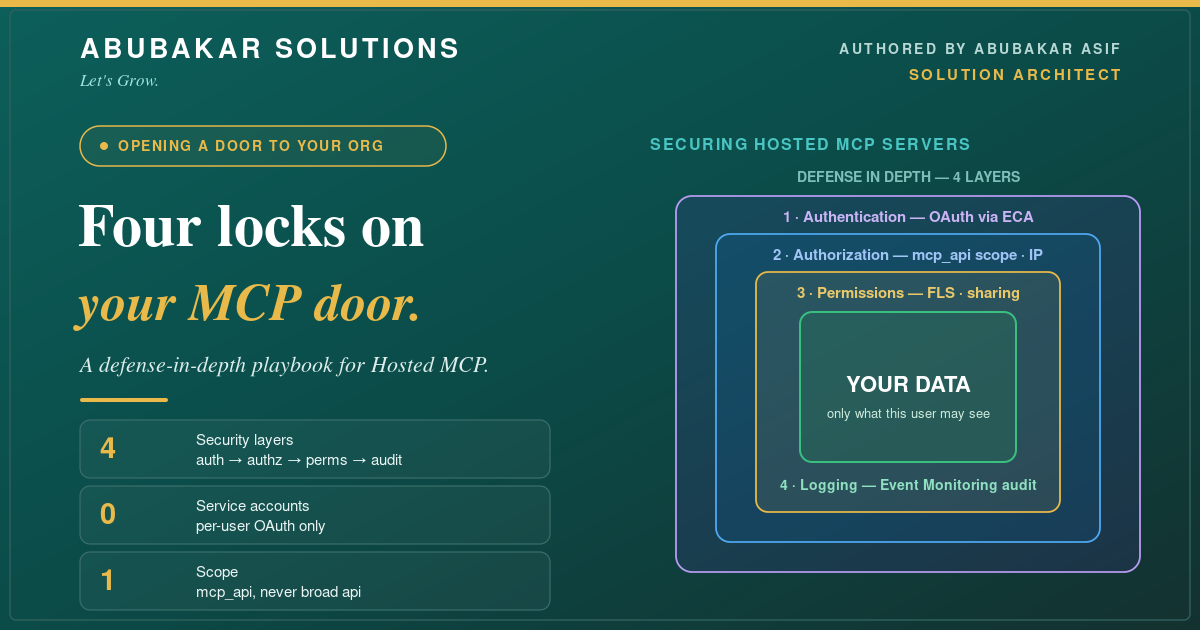
The Four-Layer Security Model
Think of it as defense in depth: identity, then permitted actions, then granular data controls, then the audit trail. Get all four right and no single mistake is fatal.
Layer 1 — Authentication: OAuth Through External Client Apps
MCP uses OAuth 2.0, and Salesforce supports only the authorization code flow through an External Client App (ECA) — which means a real user authenticates with Salesforce, and the MCP session is tied to that individual account. There is deliberately no service-account or machine-to-machine option. That constraint is a feature: it kills Aria’s risky instinct at the source.
- 🔹 Use a dedicated ECA per MCP client. Don’t share one External Client App across clients — a per-client ECA means you can restrict, monitor, and revoke each one independently.
- 🔹 Grant the narrow scope. Salesforce added a purpose-built `mcp_api` scope (“Access Salesforce hosted MCP servers”) — use it *instead of* the broad `api` scope, so a token can only reach MCP, nothing else.
Layer 2 — Authorization: Lock Down Who and From Where
Authentication proves identity; authorization decides what that identity may reach. This is where you tighten the blast radius.
- 🔹 Servers are off by default. Enable only the specific Hosted MCP servers you actually need — selective activation is your first gate.
- 🔹 Restrict by profile / permission set. App policies on the ECA limit authentication to users with the right profiles or permission sets — not the whole org.
- 🔹 Restrict by network. Add IP range restrictions via Network Access so tokens only work from expected locations.
- 🔹 Shorten token life. The refresh token defaults to a one-year lifetime; reduce it for production so a leaked token expires fast.
- 🔹 Keep the kill switch handy. You can revoke tokens anytime from the OAuth Usage menu — know where it is before you need it.
Layer 3 — Permission Controls: Least Privilege, Enforced
Here’s the reassuring part: MCP tools run with the authenticated user’s own permissions. Object CRUD, field-level security, and record sharing all apply automatically, per request. Your job is to make sure that user’s permissions are *already* least-privilege — because the agent inherits exactly them.
- 🔹 Design the persona first. Decide what the human behind the client should be able to do, then build the permission set to match — nothing more.
- 🔹 Test before you trust. Validate access with the `runAs` method so you *prove* what the tool can and can’t reach before it’s live. This is the same “prove it before you ship it” discipline from my AI enablement playbook.
- 🔹 Expose tools with intent. Annotate custom tools with behavioral hints — flag destructive operations clearly — so both the client and your reviewers know what a tool actually does.
Layer 4 — Logging: Prove Who Did What
Security you can’t audit isn’t security. Every MCP call is captured automatically through Event Monitoring.
- 🔹 Find the events. Setup → Event Log File Browser, filter by the API Total Usage event type.
- 🔹 Identify MCP traffic. Look for `API_CLIENT_CATEGORY = SALESFORCE_HOSTED_MCP` — that isolates MCP calls from the rest of your API activity.
- 🔹 Review the details. Each entry ties an action to a user, the objects touched, status codes, and client IP — everything you need to spot an error pattern or an unauthorized attempt.
Best Practices
- ✔️ Never reuse a service account. MCP is per-user by design — lean into it. If you’re reaching for an integration user, stop.
- ✔️ `mcp_api`, not `api`. Narrow scope is the single highest-leverage control here.
- ✔️ One ECA per client. Isolation makes revocation and monitoring surgical instead of all-or-nothing.
- ✔️ runAs every tool. Prove least privilege before go-live, then re-audit permissions on a schedule.
- ✔️ Watch the logs. Schedule a regular review of the SALESFORCE_HOSTED_MCP events; anomalies are your early warning.
Conclusion
Opening MCP to AI clients is opening a door — and Salesforce hands you four solid locks. Here’s the playbook:
- ✔️ Authentication — OAuth auth-code via a dedicated ECA, tied to a real user, never a service account.
- ✔️ Authorization — the `mcp_api` scope, profile/permission-set policies, IP ranges, and short-lived tokens.
- ✔️ Permission controls — least-privilege personas, with FLS and sharing enforced per request and proven via `runAs`.
- ✔️ Logging — full audit through Event Monitoring, filtered to `SALESFORCE_HOSTED_MCP`.
Configure all four deliberately and you get the upside of MCP — Salesforce, live, in your AI clients — without betting the org on a single token. Start by enabling one server with the narrow scope and a tightly-scoped permission set; expand from a position of control.
Securing an agent’s access to your org is architecture work, not a checkbox — and it’s exactly what I do. If you’re standing up Hosted MCP Servers and want the security model designed right the first time, let’s talk. And if you haven’t yet, start with the companion piece: connecting Slack to Salesforce with Hosted MCP Servers.
What’s your biggest worry about giving an AI client access to your org? Tell me in the comments — I’ll answer.