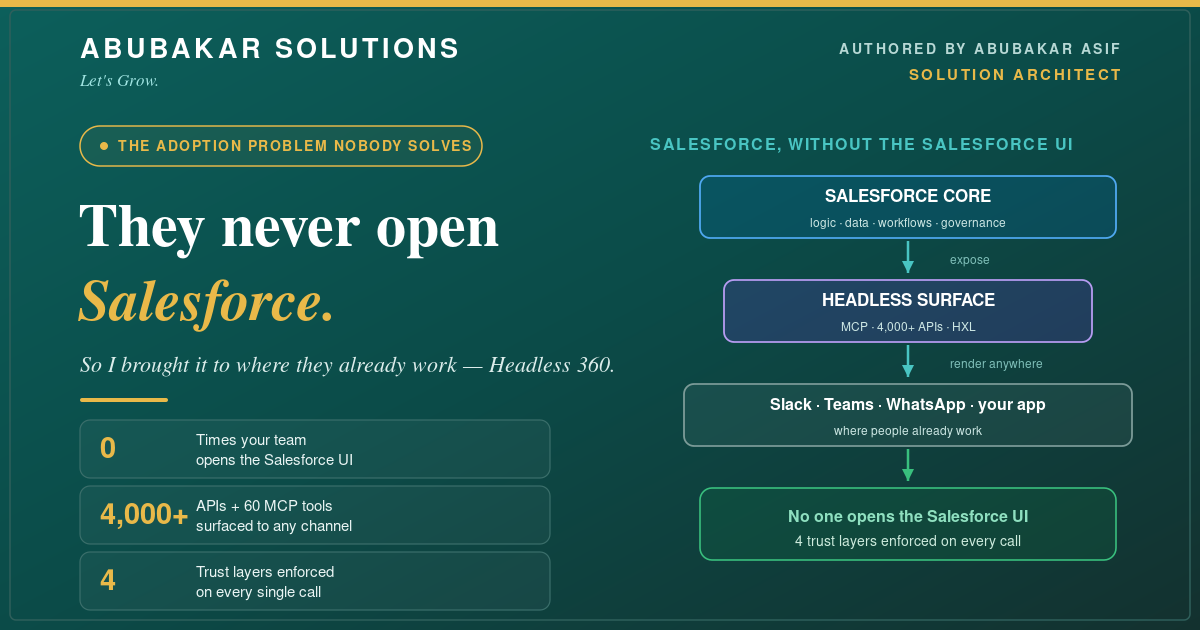
The most expensive CRM problem I get called in to fix has nothing to do with the CRM. It’s adoption. A company buys Salesforce, configures it beautifully — and then the people who are supposed to use it never open it, because they already live somewhere else all day: Slack, Teams, a custom app, a dispatch board. Data goes in late or never, reports can’t be trusted, and “let’s deploy an AI agent” is a non-starter because there’s no safe, governed way to reach the platform from where work actually happens. When Salesforce announced Headless 360 in 2026, it was the first time I had a clean, first-class answer to this exact problem. Here’s a use case where I put it to work.
What I’ll Cover in This Blog
- ✔️ The client and the real problem — a team that would not leave Slack
- ✔️ What Headless 360 actually is — Salesforce, minus the Salesforce UI
- ✔️ The architecture I built — surfaces, MCP, APIs, and the HXL
- ✔️ How every call stays safe — the four trust layers
- ✔️ The outcome, and an honest read on what’s mature vs. early
The Scenario
Ridgeline Logistics (anonymized) is a mid-size freight operator. Their dispatchers and operations team run the business inside Slack and a custom load-board app — that’s where loads get assigned, exceptions get resolved, and drivers get updated, all day. Salesforce held the accounts, cases, and the shipment records of truth, but adoption sat around 30%. Dispatchers wouldn’t tab over to a CRM to log a status when a truck was waiting; managers didn’t trust the reports because the data was hours stale; and leadership’s request for an “AI assistant that answers shipment questions” had stalled for a year, because no one could safely connect an agent to live, permissioned Salesforce data.
The instinct everyone had — “train them to use Salesforce” — had failed twice already. The team wasn’t going to move. So the right architecture wasn’t to move them. It was to bring Salesforce to them.
What Headless 360 Actually Is
Salesforce frames Headless 360 as *”the platform that makes it possible for humans and agents to work together across any surface — Slack, Teams, ChatGPT, and more.”* The one-line version I give clients: the business logic, data, workflows, permissions, and governance that live inside Salesforce become accessible from anywhere, without requiring anyone to open the Salesforce UI. Crucially, Salesforce calls it *”an ‘and,’ not an ‘or'”* — it expands Lightning Experience, it doesn’t replace it. That mattered to Ridgeline’s admins, who weren’t giving up their build tools.
It rests on four pillars, and all four mattered to this build: Skills (30+ prebuilt actions that let coding agents like Claude Code and Cursor work against the org), MCP/APIs (60+ Model Context Protocol tools plus the 4,000+ existing Salesforce APIs), Metadata (org-aware grounding so a tool understands *your* data model), and the Headless Experience Layer (HXL) — the rendering system that surfaces experiences into Slack, Teams, WhatsApp, and Voice.
The Architecture I Built for Ridgeline
I didn’t rebuild anything in Salesforce. The records of truth, the Flows, and a shipment-status Agentforce agent already existed. Headless 360 let me *expose* them into the two surfaces the team actually used — the Slack dispatch channel and the custom load-board app — through MCP tools and APIs, rendered via the HXL.
- 🔹 In Slack, dispatchers now ask the shipment-status agent in plain language and get an answer rendered as Slack blocks — and log a status update — without leaving the channel.
- 🔹 In the load-board app, live Salesforce shipment data appears inline through the APIs, and updates write straight back to the system of record.
- 🔹 Nothing in Salesforce was rebuilt. I exposed existing logic and data; the HXL handled rendering; MCP and APIs handled the reach. This is the “and, not or” in practice — the admins kept building in Lightning; the team kept working in Slack.
How Every Call Stays Safe
The reason this is architecture and not a hack is the trust model. Salesforce enforces four layers on every single call, regardless of which surface it came from — and this is exactly what had blocked Ridgeline’s AI plans before.
- 🔹 Identity — the agent or request acts *as a specific user*, never as an anonymous service account. A dispatcher’s request runs with the dispatcher’s identity.
- 🔹 Access — sharing rules, field-level security, and permission sets apply. A user only ever sees, in Slack, what they could see in Salesforce.
- 🔹 Invocation scope — only the tools you explicitly expose are reachable. The Slack agent could read shipment status and log an update; it could not touch billing.
- 🔹 Governance — validation rules, triggers, approval chains, and governor limits fire regardless of entry point. A bad status update gets rejected in Slack for the same reason it would in the UI.
This is the same per-user, least-privilege discipline I wrote about for securing hosted MCP servers — Headless 360 makes it the default across every surface, which is what finally made “deploy an agent” a safe sentence at Ridgeline.
How I Built It Fast — Two Surfaces, One Trust Layer
Headless 360 has two sides, and I used both.
- 🔹 Build-time (coding agents). The 30+ Skills and 60+ MCP tools let me point Claude Code at the org to read metadata, generate the Apex and configuration I needed, run tests, and deploy — the mature, developer-facing half of Headless 360. It compressed the build. (For context, Salesforce cites the travel platform Engine deploying enterprise apps *across any surface in 12 days* on Headless 360.)
- 🔹 Runtime (business agents). The end-user half — the dispatcher asking the agent in Slack — is newer. Salesforce is honest that runtime today shines on *straightforward use cases* (a case summary in Slack, a status lookup) with the broader vision still developing. I scoped Ridgeline’s first agent to exactly that: read status, log an update, escalate the rest. Ship the boring, reliable thing first.
The Outcome
Within the first phase, the numbers that had been stuck for a year started moving — because the work finally happened where the data lived, not in a CRM tab nobody opened. Adoption is a behavior problem, and the only durable fix is to stop asking people to change their behavior. Salesforce data got fresher because logging a status became a two-second action in Slack. Reports became trustworthy again. And the AI assistant leadership had wanted for a year shipped — safely — because the trust layer was already enforced on every call.
Common Pitfalls
- ✔️ Don’t treat runtime as finished. Scope business-agent use cases to the simple, high-value ones today; the platform is early there by Salesforce’s own framing.
- ✔️ Expose the minimum. Invocation scope is a feature — surface only the tools a surface needs, nothing more.
- ✔️ Let permissions do the work. Model the user’s Salesforce access correctly; the headless surface inherits exactly that. Get the persona right first.
- ✔️ It’s an “and.” Keep building in Lightning. Headless 360 extends reach; it isn’t a migration.
- ✔️ Design for write-back, not just read. The adoption win comes when people can *update* the record of truth without leaving their tool — not just read it.
Conclusion
The lesson Ridgeline taught me is one I’ll reuse on every low-adoption org: don’t move the people, move the platform. Here’s the shape of it:
- ✔️ The problem is adoption — a great CRM no one opens is worthless.
- ✔️ Headless 360 is Salesforce without the UI — logic, data, workflows, and governance, reachable from any surface.
- ✔️ The architecture surfaces, it doesn’t rebuild — expose existing Salesforce into Slack and your apps via MCP, APIs, and the HXL.
- ✔️ The four trust layers make it safe — identity, access, invocation scope, and governance on every call.
- ✔️ Ship the simple runtime use case first — read, update, escalate; expand as the platform matures.
If your Salesforce adoption is stuck because your team lives somewhere else all day, that’s not a training problem — it’s an architecture opportunity, and it’s exactly the kind of work I do.
Want to bring Salesforce into the tools your team already uses — Slack, Teams, or your own app — without a painful migration? Tell me where your people actually work and let’s map a Headless 360 architecture to it.
Where does your team spend its day — and what would change if Salesforce met them there? Tell me in the comments.