
Introduction
Salesforce Prompt Templates offer a powerful way to generate dynamic content for various use cases, including Agent Assistance, Email Campaigns, Customer Communication, and Internal Collaboration. While Prompt Templates allow basic merge fields, integrating Apex provides a more flexible and data-rich experience.
This blog will guide you through using Apex with Prompt Templates, focusing on a simple scenario: retrieving an Opportunity and its related Account details using an InvocableMethod in Apex. While the example is simple, the same principles can be extended for more complex use cases.
When to Use Apex in Prompt Templates?
While Prompt Templates allow direct merge fields, you should consider Apex integration when:
- You need data from multiple related objects (e.g., Opportunity + Account details).
- The required data filtering, formatting, or processing is too complex for simple merge fields.
- You need to call external APIs or execute custom logic before generating the prompt.
Ground with Apex Merge Fields
You can use an Apex merge field in a prompt template to return data from a SOQL query or to return data from an external API. Apex is also effective if you want to generate well-formatted JSON or do programmatic data filtering.
Required Editions
Available in: Lightning Experience Available in: Enterprise, Performance, and Unlimited Editions with the Einstein for Sales, Einstein for Platform, or Einstein for Service add-on.
To use Apex in Prompt Builder, you create an Apex class with these requirements:
- The Apex class must contain one method annotated with @InvocableMethod. For details, see the Apex Developer Guide.
- The @InvocableMethod annotation can specify a CapabilityType that matches the prompt template type.
- This table lists the CapabilityType for each prompt template type:
Prompt Template TypeCapabilityTypeSales EmailPromptTemplateType://einstein_gpt__salesEmailField GenerationPromptTemplateType://einstein_gpt__fieldCompletionFlexFlexTemplate://template_API_NameRecord PrioritizationPromptTemplateType://einstein_gpt__recordPrioritizationRecord SummaryPromptTemplateType://einstein_gpt__recordSummary
If you change the inputs for a flow or Apex class that’s used as a resource in a prompt template, the prompt template no longer works, and you can’t save new versions of the prompt template.
Method Input and Output
- The method’s input parameter must have a List<Request> type.
- The Request class defines an @InvocableVariable member for each input defined by the prompt template type.
Example:
public class Request {
    @InvocableVariable
    public Account relatedEntity;
}
- The method output must have a List<Response> type containing a single string member named Prompt that’s annotated with @InvocableVariable.
What is an InvocableMethod and InvocableVariable?
InvocableMethod
An @InvocableMethod annotation in Apex allows the method to be called from Flows, Processes, and Prompt Templates. It is used for custom business logic that needs to be executed dynamically.
InvocableVariable
The @InvocableVariable annotation allows variables in an Apex class to be exposed and mapped to external inputs (e.g., Prompt Templates). These variables can hold objects or primitive data types.
Apex Code for Fetching Opportunity and Account Details
Below is the Apex class that retrieves Opportunity details along with its related Account information.
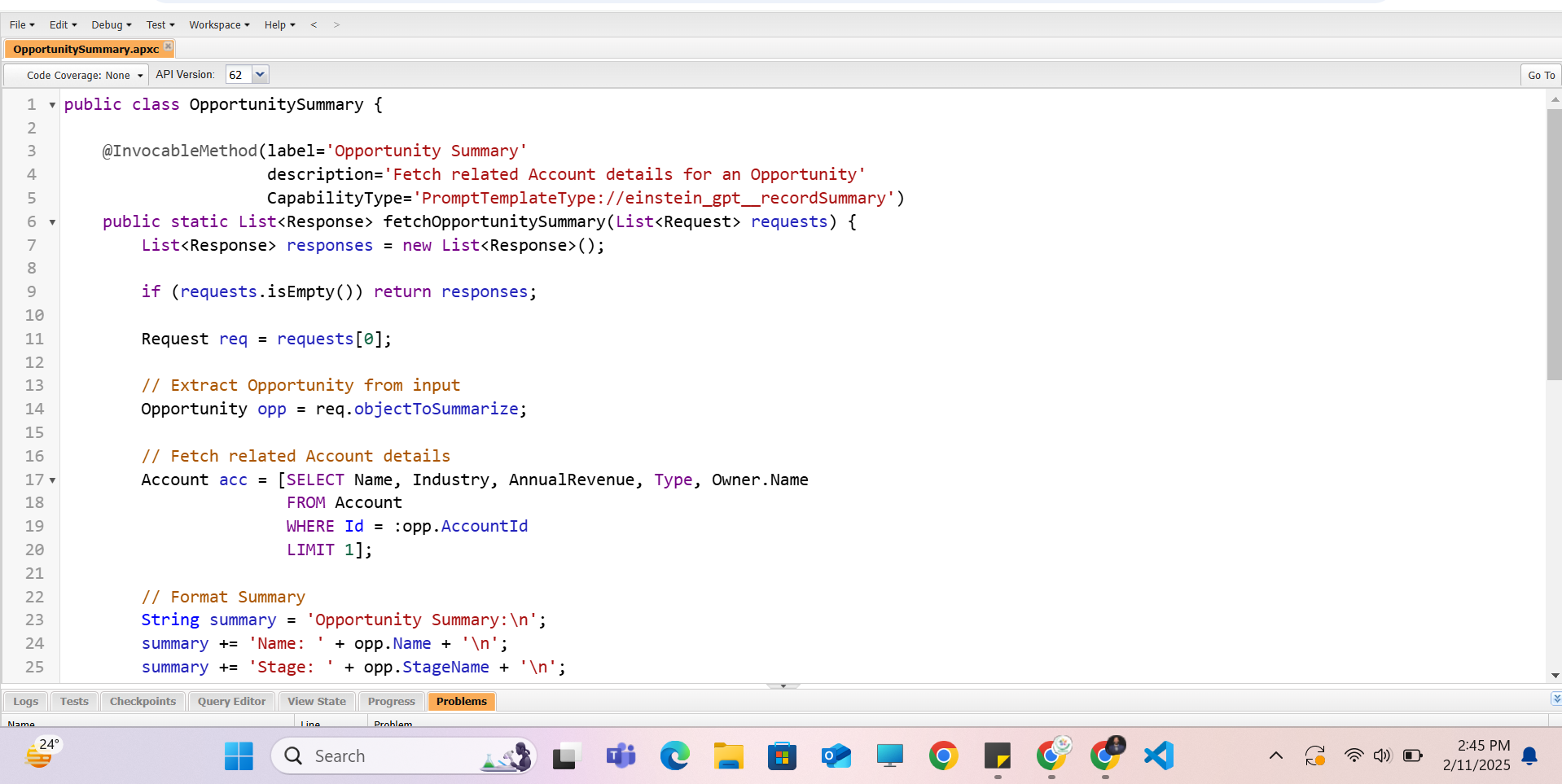
public class OpportunitySummary {

    @InvocableMethod(
        label='Opportunity Summary'
        description='Fetch related Account details for an Opportunity'
    )
    public static List<Response> fetchOpportunitySummary(List<Request> requests) {
        List<Response> responses = new List<Response>();

        for (Request req : requests) {
            Opportunity opp = req.opportunity;

            // Fetch related Account details
            Account acc = [SELECT Name, Industry, AnnualRevenue, Type, Owner.Name
                           FROM Account
                           WHERE Id = :opp.AccountId
                           LIMIT 1];

            // Format Summary
            String summary = 'Opportunity Summary:\n';
            summary += 'Name: ' + opp.Name + '\n';
            summary += 'Stage: ' + opp.StageName + '\n';
            summary += 'Close Date: ' + opp.CloseDate + '\n';
            summary += 'Amount: ' + opp.Amount + '\n';
            summary += 'Owner: ' + opp.Owner.Name + '\n';
            summary += 'Account: ' + acc.Name + '\n';
            summary += 'Industry: ' + acc.Industry + '\n';
            summary += 'Account Type: ' + acc.Type + '\n';
            summary += 'Annual Revenue: ' + acc.AnnualRevenue + '\n';
            summary += 'Account Owner: ' + acc.Owner.Name + '\n';

            // Create Response
            Response res = new Response();
            res.Prompt = summary;
            responses.add(res);
        }
        return responses;
    }

    public class Request {
        @InvocableVariable
        public Opportunity opportunity;
    }

    public class Response {
        @InvocableVariable
        public String Prompt;
    }
}
Line-by-Line Explanation of Apex Code
- Class Declaration: OpportunitySummary class is created.
- @InvocableMethod Annotation: Makes fetchOpportunitySummary callable in Prompt Templates.
- Method Signature: Takes a list of Request objects (holding Opportunity data).
- Loop through Requests: Iterates over each Opportunity in the list.
- Fetch Related Account: Retrieves Account details based on AccountId from Opportunity.
- Format Summary String: Constructs a detailed Opportunity summary.
- Create Response Object: Stores the summary inside Response.Prompt.
- Return List of Responses: Returns the summary to be used in Prompt Templates.
How to Add Apex to a Prompt Template?
Follow these steps to integrate Apex with your Prompt Template:
- Navigate to Setup → Prompt Builder in Salesforce.
- Create a New Prompt Template or select an existing one.
- Click ‘Add Resource’ → Select Apex.
- Choose Your Apex Class → OpportunitySummary.
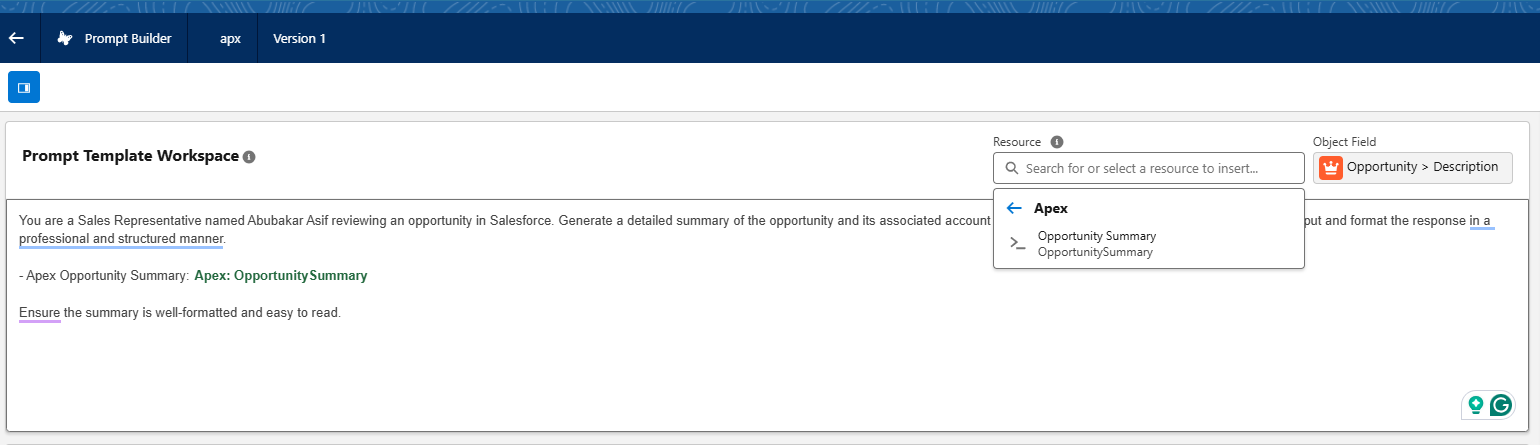
- Map Inputs → Ensure Opportunity object is passed as input.
- Use Merge Fields → Insert Apex response fields into the prompt.
- Test and Save → Preview the output before finalizing.
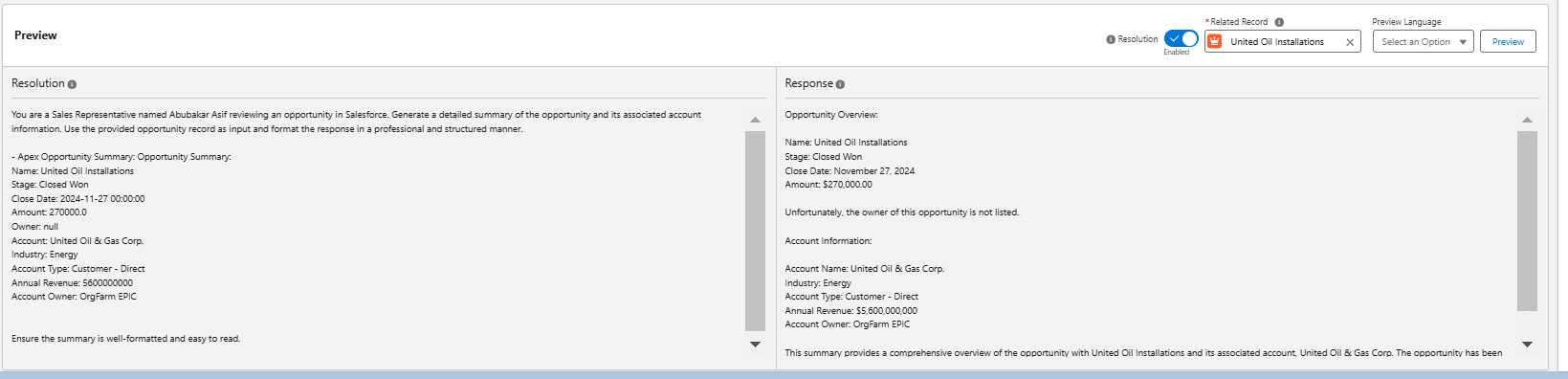
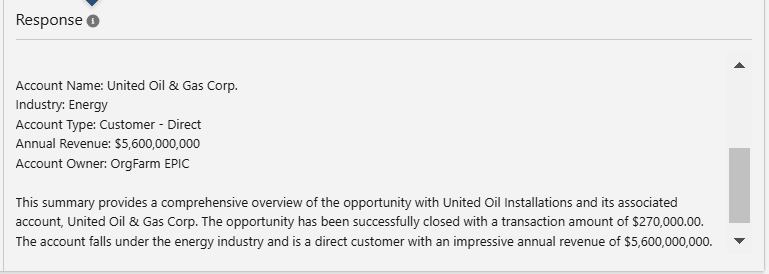
Conclusion
By leveraging Apex with Prompt Templates, you can retrieve complex data and enhance automation within Salesforce. Start with this basic integration, then scale your solution to boost productivity and streamline communications in Salesforce!